Connect Manager.io to Nigeria E-Invoicing
Manager.io Nigeria E-invoice Connector provides a business-scoped MBS/NRS integration with separate TEST and PRODUCTION processing, Sales Invoice and Credit Note support, NRS IRN and QR write-back, payment-status synchronisation and guided self-service onboarding.
Built around the Manager.io invoicing workflow
Process Nigeria e-invoices while continuing to use your normal Manager.io accounting workflow.
Sales Invoice Processing
Validate, sign and submit Manager.io Sales Invoices to the configured MBS/NRS environment.
Credit Notes
Process Credit Notes with verified linkage to the original submitted invoice and its NRS IRN.
TEST & PRODUCTION
Server-locked TEST and PRODUCTION routes keep sandbox processing separate from official production records.
NRS IRN & QR Code
Write the issued NRS IRN and encrypted QR image back into Manager.io for customer-facing documents.
Payment Status Sync
Synchronise final payment status after Manager.io confirms that the invoice closing balance has reached zero.
Business-Scoped Security
Each Manager.io business uses its own tenant record, encrypted credentials, subscription and processing history.
From installation to live processing
New businesses can complete the normal onboarding journey with minimal administrator intervention.
Create Bootstrap Button
Add the initial Nigeria E-Invoicing Custom Button in Manager.io.
Install Integration
Install the required custom fields and permanent TEST/PRODUCTION operational buttons.
Register Seller TIN
Register the Manager.io business and receive an automatic 10-successful-submission trial.
Configure TEST
Enter the tenant TEST credentials and confirm the MBS/NRS connection.
Run TEST Transactions
Validate and submit Sales Invoices or Credit Notes through the isolated sandbox route.
Configure PRODUCTION
Save, test and activate the tenant's separate live Production profile.
Go Live
Process official invoices through the Production Custom Buttons.
Annual Access
Pay through Selar and continue under the 365-day annual plan after payment verification.
Start from one Manager.io Custom Button
Create one bootstrap Custom Button in Manager.io. It opens the guided setup for the current business and installs the required e-invoicing fields and permanent TEST / PRODUCTION buttons.
Manager.io Bootstrap Setup
Create the Custom Button with the exact values shown below.
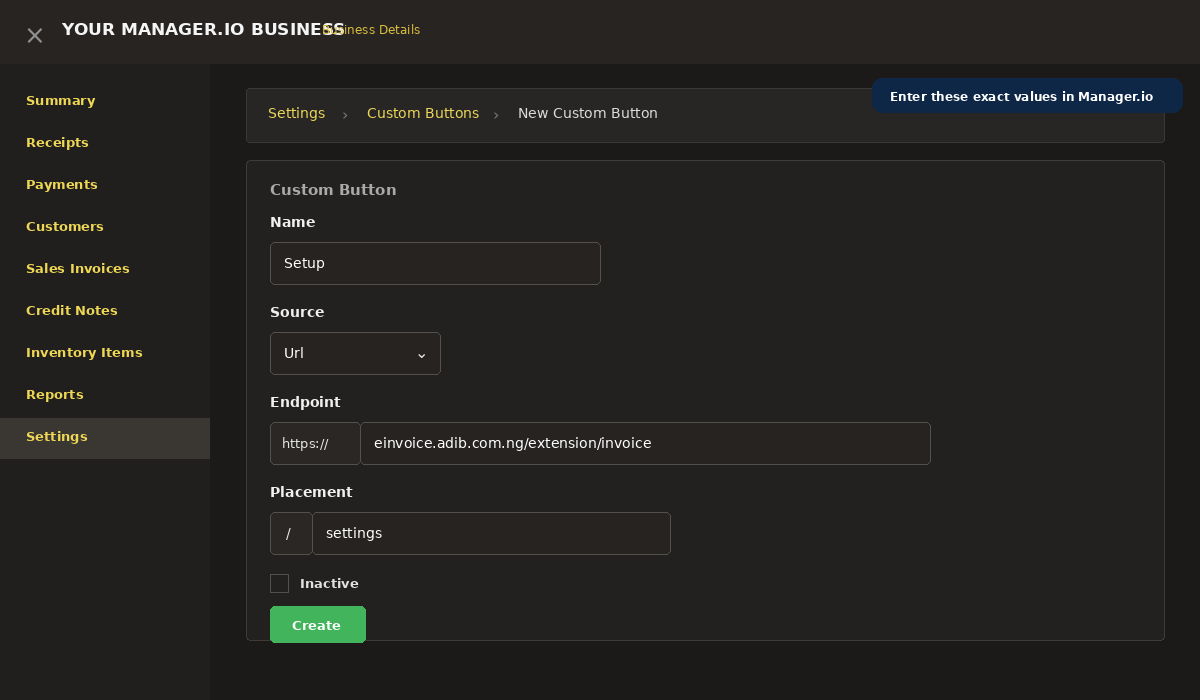
https://einvoice.adib.com.ng/extension/invoice
Save the Custom Button, return to Settings, and open Setup. On the guided page, choose Install Nigeria E-Invoicing and continue with the registration steps.
Real Manager.io e-invoicing workflow
These screenshots show actual parts of the Manager.io Nigeria E-invoice Connector workflow, from transaction processing to the final customer-facing NRS IRN and QR Code.
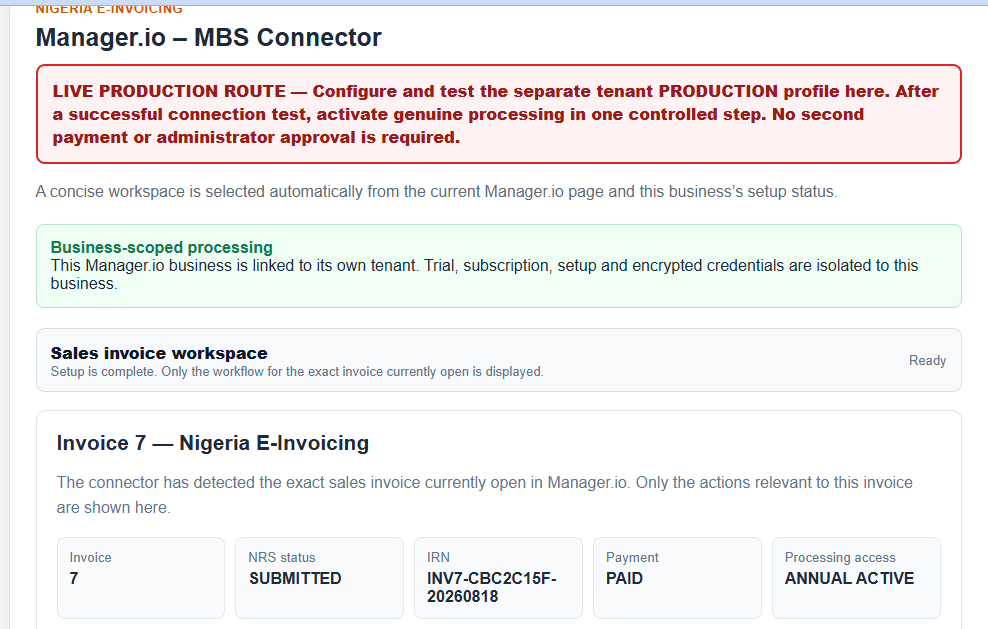
Sales Invoice Processing
Process Manager.io Sales Invoices through the appropriate TEST or PRODUCTION e-invoicing route.
View larger screenshot →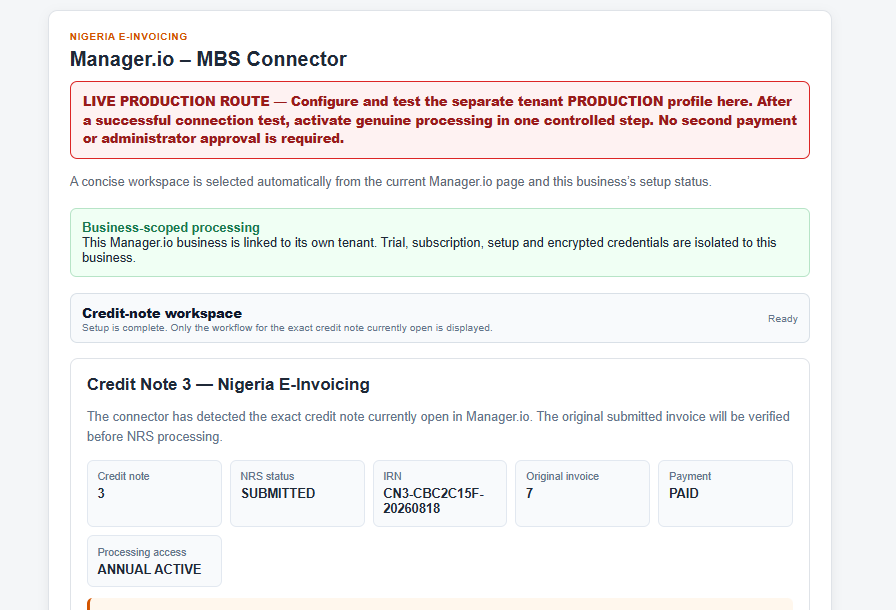
Credit Note Processing
Credit Notes retain verified linkage to the corresponding original invoice and NRS IRN.
View larger screenshot →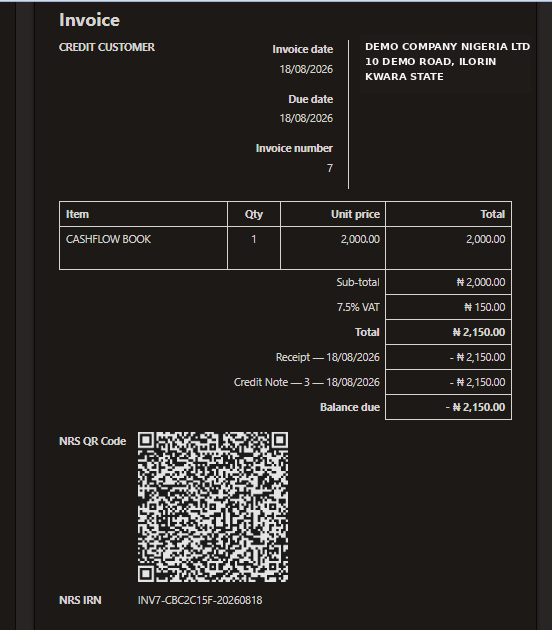
NRS IRN & QR on Invoice
The customer-facing Manager.io document can display the official NRS IRN and QR Code while operational fields remain hidden.
View larger screenshot →Screens shown are for product demonstration. Transaction values, invoice references and environments may vary by registered business.
Designed for businesses and professionals using Manager.io
The connector is intended for organisations already using Manager.io and needing a practical route into Nigeria e-invoicing through the MBS/NRS ecosystem.
Nigerian Businesses
SMEs and larger organisations using Manager.io for accounting, invoicing and customer management.
E-Invoicing Enabled Businesses
Businesses already onboarded or enabled for Nigeria NRS/MBS e-invoicing processing.
Accountants & Consultants
Accounting firms and implementation consultants managing one or more Manager.io businesses.
TEST & PRODUCTION Users
Businesses requiring strict separation between sandbox testing and official production e-invoice processing.
Sales & Credit Note Issuers
Businesses that issue Sales Invoices and Credit Notes to customers through Manager.io.
Prepare the business for a smooth setup
A few items should be ready before beginning the self-service onboarding process.
The business should already exist and be accessible in Manager.io.
Have the registered Seller TIN available for business registration.
TEST environment credentials are required to configure and test sandbox processing.
These are needed only when the business is ready to configure and activate live processing.
Business, customer and item/service information should be properly maintained.
Configure the base and any foreign currencies under Manager.io → Settings → Currencies.
Inventory and service items should have the appropriate classification codes.
Use country code NG and appropriate units such as EA for counted items or E48 for services where applicable.
Start with a trial. Upgrade when ready.
The annual plan applies per registered Manager.io business.
- 10 successful submissions
- TEST environment setup
- Sales Invoice processing
- Credit Note processing
- Production profile can be prepared during trial
- Annual processing access
- TEST and PRODUCTION environments
- Sales Invoice and Credit Note workflows
- NRS IRN and QR write-back
- Payment-status synchronisation
Common onboarding questions
Do TEST transactions affect official PRODUCTION records?
No. The application uses separate server-locked TEST and PRODUCTION routes with separate environment credentials and Manager.io operational fields.
How many free submissions are included?
A newly registered business receives 10 successful trial submissions. Failed validations or status checks do not count as successful submissions.
Can Production be configured during the trial?
Yes. A customer may configure, test and activate the separate Production profile while trial access is still available.
What appears on the customer invoice?
The standard customer-facing e-invoicing print profile is designed to expose the NRS IRN and NRS QR Code while keeping operational status fields hidden.
How does annual payment work?
Annual access is paid through the configured Selar checkout. After payment is verified, the tenant continues under the 365-day annual plan.
Can I start without Production credentials?
Yes. The business may begin with TEST configuration and trial processing first. The separate PRODUCTION profile can be configured when the business is ready to go live.
Where can I get technical support?
Contact the Adib Tech Team through WhatsApp on +234 803 567 4941 or by email at adek4971@gmail.com.
Need help with setup or e-invoicing?
Contact the Adib Tech Team for onboarding guidance, Manager.io integration assistance and technical support.
+234 803 567 4941
Get assistance with installation, TEST configuration, PRODUCTION activation, invoice processing and troubleshooting.
Chat on WhatsAppadek4971@gmail.com
Send technical enquiries, onboarding questions, implementation requests or support information by email.
Send EmailTechnical support for Manager.io Nigeria E-invoice Connector.
Ready to connect Manager.io to Nigeria E-Invoicing?
Begin with the guided installation, complete the TEST environment and move to Production when your business is ready.